Payroll in Nkapio runs by period (monthly, bi-weekly or weekly). For each period it calculates every employee's gross pay, applies statutory deductions, and gives you the net pay — then produces payslips and walks the run through review, approval, payment and closing. Configure the rates once and each run follows them.
Before you start
A run is only as good as the setup behind it. Make sure that:
- Payroll configuration is saved — the statutory rates under Payroll → Settings drive every deduction. With no configuration, deductions calculate as zero.
- Each employee has a base salary and a pay frequency in their employment details, and is marked active. A period only pays active employees whose pay frequency matches the period's type — a monthly run pays monthly earners, a weekly run pays weekly earners.
- Hours are approved — attendance, leave and timesheets for the period should be settled first, since they feed overtime and absence figures.
- You have permission to manage payroll — creating, calculating and approving periods are permission-gated actions.
Payroll periods
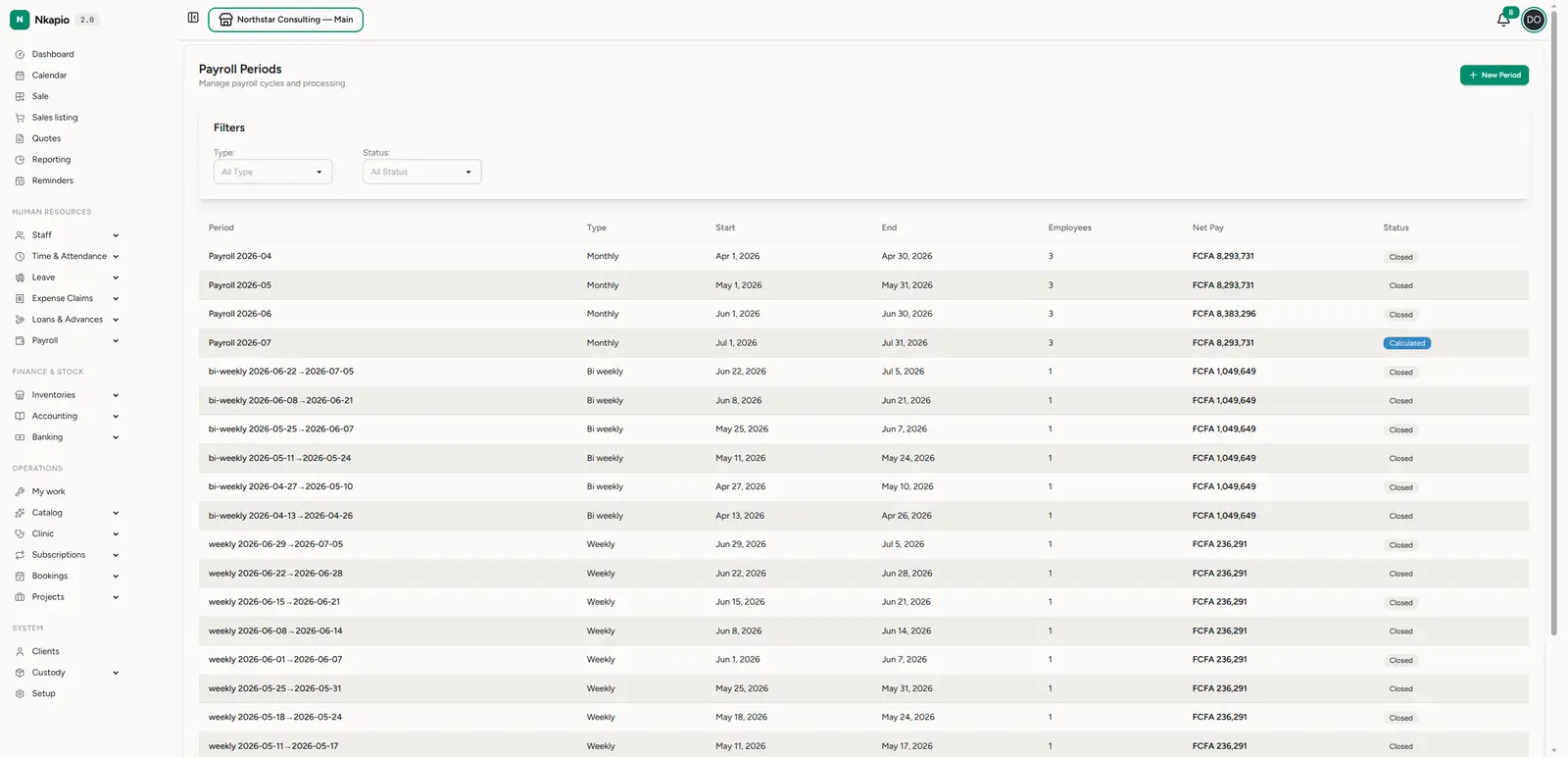
Open Payroll (/staff/payroll) for the list of pay periods. Each row shows
the period, its type (monthly / bi-weekly / weekly), the start and
end dates, the number of employees, the total net pay, and a
status. Filter by type or status, or click New Period to define the next
cycle — its name, type, dates, payment date and optional attendance / timesheet
/ expense cut-off dates.
A period moves through a fixed lifecycle: Draft → Calculated → Under Review → Approved → Processed → Paid → Closed.
Running a period
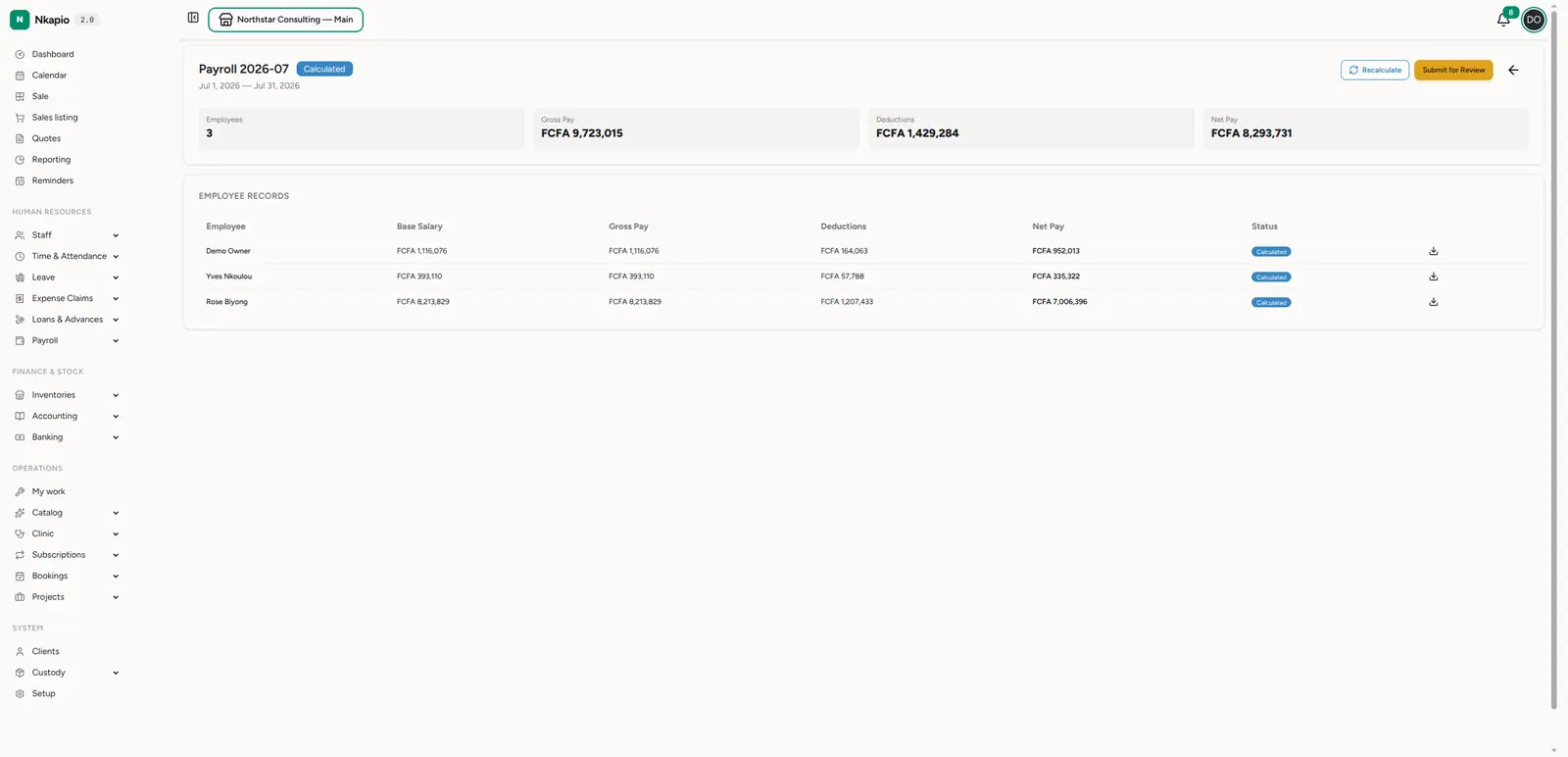
Open a period to process it. The header cards summarise Employees, Gross pay, Deductions and Net pay for the whole run. The Employee records table breaks it down per person — base salary, gross, deductions, net, and each one's status — with a payslip to download.
Each stage has its own button, and only the button valid for the current status appears:
- Calculate (from Draft) — generates a record per eligible employee.
- Recalculate (from Calculated) — deletes the existing records and regenerates them; use it after a new hire, an updated salary or rate, or approved overtime.
- Submit for Review (from Calculated) — hands the figures off for checking.
- Approve (from Under Review) — signs off the numbers.
- Process (from Approved) — finalises the run and locks the period so figures can't drift.
- Mark Paid (from Processed) — pick the account to pay from; Nkapio records the outflow and settles the related loan repayments, advance recoveries and expense reimbursements for the period.
- Close (from Paid) — archives the cycle.
You can only edit a period while it's still in Draft.
What each payslip includes
Earnings roll up into gross pay: basic pay (prorated by working days for weekly / bi-weekly periods), overtime pay, time-bank cash-outs, expense reimbursements and commissions (up to any per-period cap).
Deductions come off gross pay in two layers:
- Statutory — income tax, employee social security, health insurance and retirement, each a percentage of gross pay from your configuration.
- Discretionary — loan repayments and advance recoveries due in the period, plus an absence deduction for unpaid absences and unpaid leave. Paid leave and public holidays are never docked.
Net pay never drops below zero: if discretionary deductions would exceed what's left after statutory deductions, Nkapio trims them (absence first, then loans, then advances) and carries the rest forward.
Payroll configuration
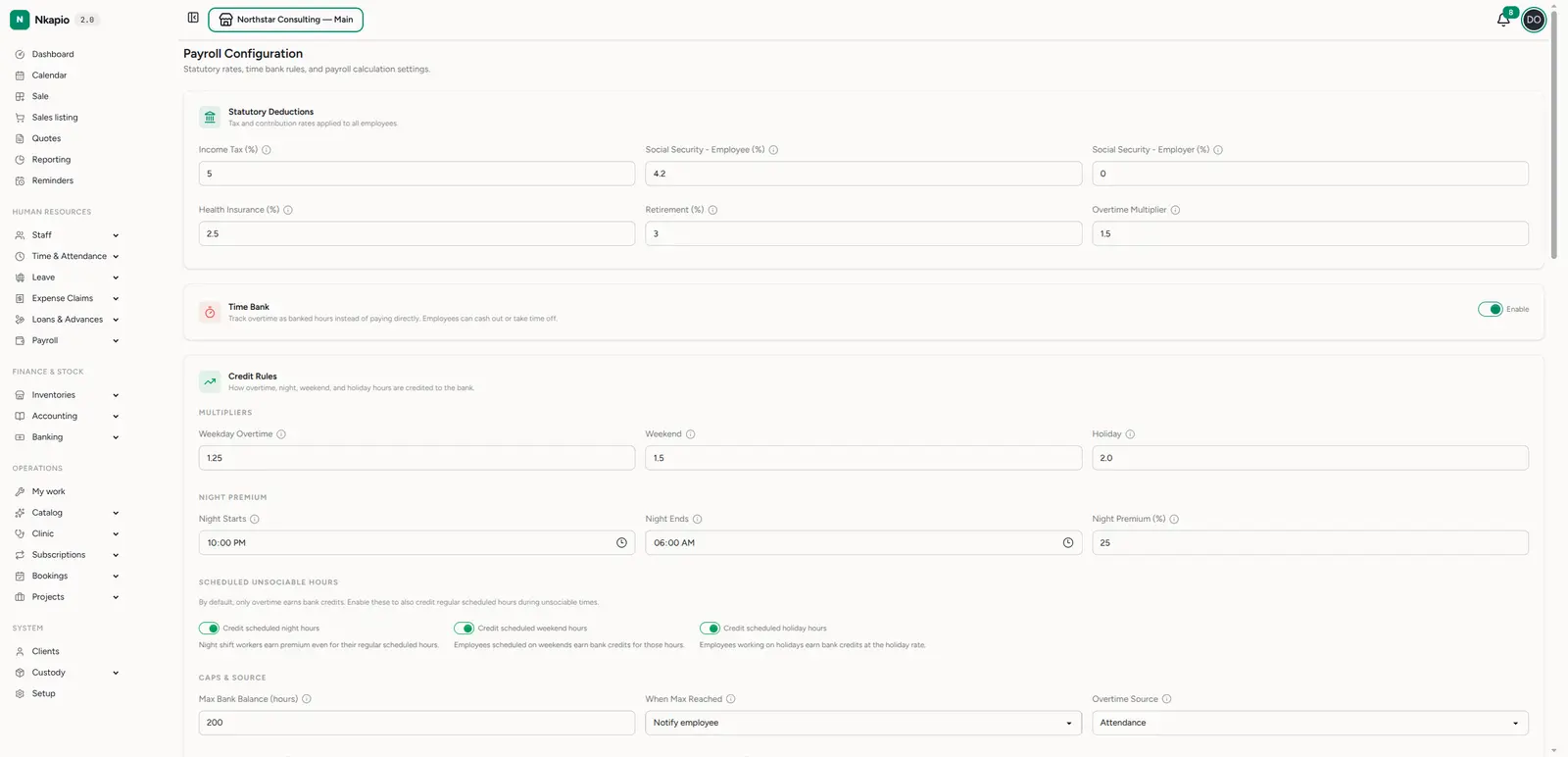
Set the rules once under Payroll → Settings (/staff/payroll/settings):
- Statutory deductions — income tax, employee/employer social security, health insurance, retirement, and the overtime multiplier.
- Time bank — track overtime as banked hours instead of paying it directly, with credit rules for weekday overtime, weekend and holiday multipliers, and a night premium.
- Caps & source — the maximum bank balance and where overtime hours come from (attendance or timesheets).
These settings drive every calculation, so getting them right once keeps every run correct.
Tips
- Approve timesheets first — payroll is only as accurate as the hours behind it. See Timesheets and attendance.
- Recalculate after any change — never assume a period is current if salaries, rates or hours changed since it was calculated. Recalculating rebuilds every record.
- Process locks the period — once processed, the figures are frozen, so review carefully before you move past Approved.
- Close periods promptly — closing keeps historical pay from drifting.