For anything with a shelf life — drinks, food, medication, cosmetics — Nkapio tracks a best-before date per lot so you can sell oldest-first (FEFO) and catch stock before it expires. It's built for the people who live with that risk day to day: the store manager who has to write off spoiled goods, the pharmacist who can't dispense out-of-date medication, the bar owner watching a crate of drinks creep toward its date. Find it under Inventories → Expiry (available when expiry tracking is enabled).
How expiry tracking works
Expiry is a property of a product's tracking type. When you mark a product as perishable, its stock isn't just a running quantity — it's received in lots, and each lot carries the best-before date for that batch. Two different deliveries of the same product become two lots with two dates, tracked separately.
From there, Nkapio does two things automatically:
- FEFO picking (first-expiry-first-out) — when you sell or dispense a perishable product, Nkapio draws from the soonest-expiring lot first, so the stock most at risk always leaves first. You don't have to pick the batch by hand.
- A near-expiry alert window — each lot gets an alert date, worked out as the best-before date minus a warning period set on the product (14 days by default, adjustable per product). Once a lot crosses that date it counts as expiring soon.
The expiry dashboard
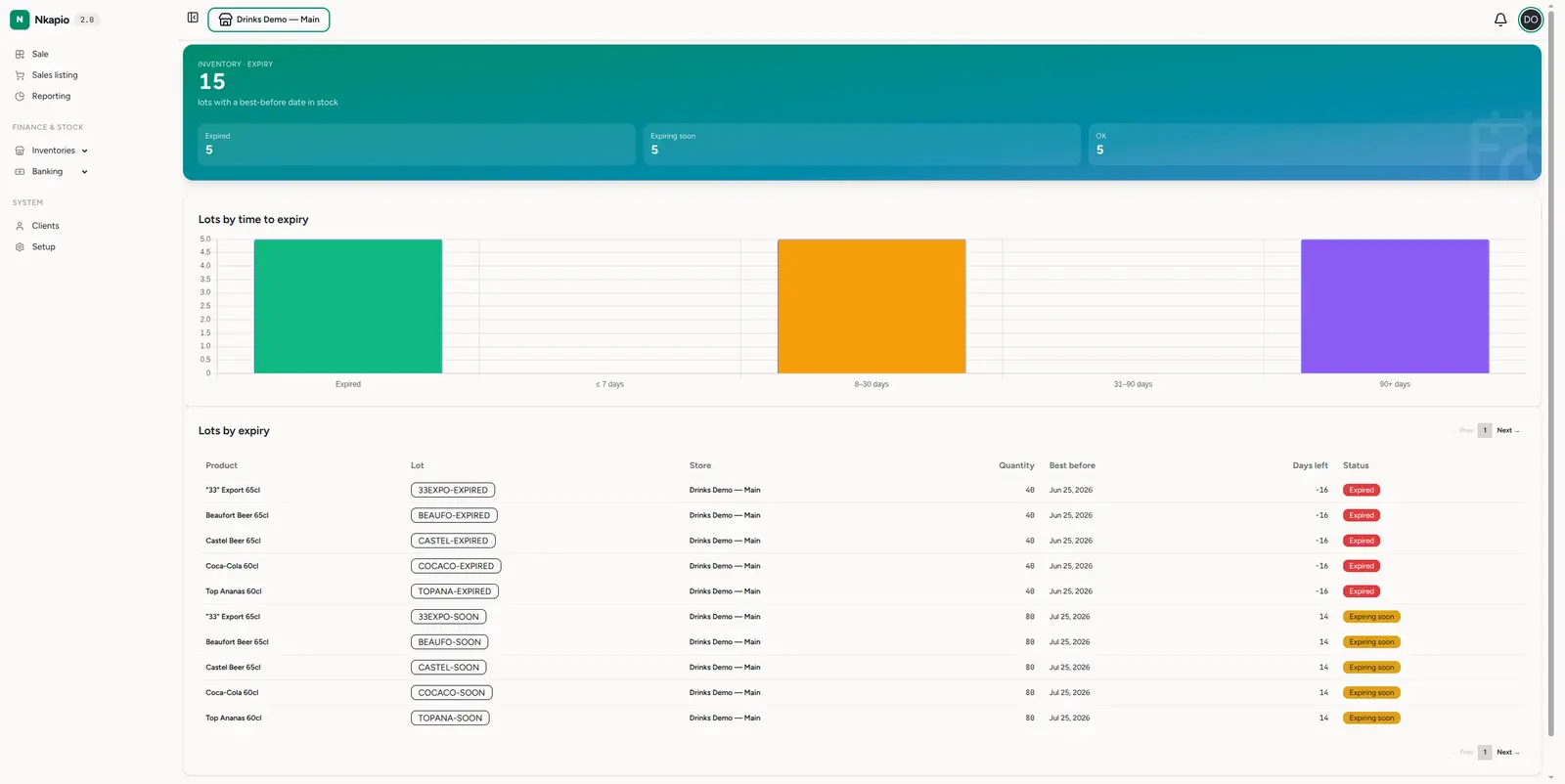
Inventories → Expiry (/inventories/expiry) shows every lot with a
best-before date and stock still on hand. The headline counts lots in stock,
split into expired, expiring soon and OK. A lots-by-time-to-expiry
chart buckets them (expired, ≤7 days, 8–30 days, 31–90 days, 90+ days), and the
lots by expiry table lists each one — product, lot number, store,
quantity, best-before date, days left, and a status badge (red for
expired, amber for expiring soon, green for OK). Lots are ordered soonest-first,
so your highest-risk stock sits at the top.
Near-expiry alerts
You don't have to keep checking the dashboard. Nkapio runs a daily scan and sends a notification when a lot approaches its best-before date (it enters the alert window) and again when a lot has expired. Each lot raises each alert once, so you get a timely heads-up without a flood of repeats. These alerts sit alongside your other stock notifications — see Stock alerts and logs.
Before you start
- Expiry tracking must be enabled for your workspace. If you don't see Inventories → Expiry, it isn't switched on for your plan yet.
- You need inventory access. The dashboard follows your product permissions — if you can view products, you can view the expiry report.
- Products must be set to perishable. A product tracked as plain quantity has no lots and no dates, so nothing shows here. Set the tracking type to perishable, then receive against it.
- Dates come in at intake. Expiry only works if goods are received against a lot with a best-before date — see Add products and track stock.
- Expired stock is held back from sale. By default, once a lot passes its best-before date Nkapio stops it being sold, so out-of-date goods don't slip onto an invoice by accident.
Tips
- Sell oldest-first (FEFO) — Nkapio already picks the shortest-dated lot for you; the days-left column tells you what to push on the shop floor.
- Act on "expiring soon" before it turns red — discount, bundle or return stock while it still has value, rather than writing it off later.
- Tune the warning period per product — give slow sellers a longer lead time and fast movers a shorter one, so alerts land when you can still act on them.
- Record lots accurately at intake — the whole picture depends on each batch arriving with the right best-before date.
FAQ
A product with a shelf life isn't showing up. Why? It's most likely not set to perishable, or its stock was received without a best-before date. Only lots that have a best-before date and still hold stock appear on the dashboard.
What happens to a lot once it expires? It stays visible with a red Expired badge so you can clear it, and by default it's blocked from being sold. Remove the remaining quantity with a stock adjustment once you've discarded or returned it.
Does Nkapio pick the batch for me when I sell? Yes. For perishable products it draws from the soonest-expiring lot in stock first — that's FEFO — so you don't have to choose manually.