Not all money that comes in is a sale. Other revenue is for income that has no invoice or POS sale behind it — sub-letting part of your premises, a grant, bank interest, an insurance payout, a supplier reimbursement, a refund of a deposit. Recording it here keeps your cash position accurate and your books complete, without pretending it was a product or service you sold.
Anyone on your team who looks after the books — an owner, an accountant, or whoever reconciles the cash box at day's end — will use this. Each entry is tied to the person who logged it, so there's always a clear record of who brought the money in.
When to use other revenue (and when not to)
Reach for other revenue whenever cash arrives that isn't tied to a customer buying something from you:
- Use it for rent from a tenant, a grant or donation, interest paid by your bank, an insurance settlement, a reimbursement, or any one-off receipt that has no catalogue item behind it.
- Don't use it for a sale of your products or services. Those belong in the POS or on an invoice, so the income lands in your sales reports and against the right customer. Other revenue deliberately sits outside that flow — it's the place for everything a sale doesn't cover.
The other-revenue list
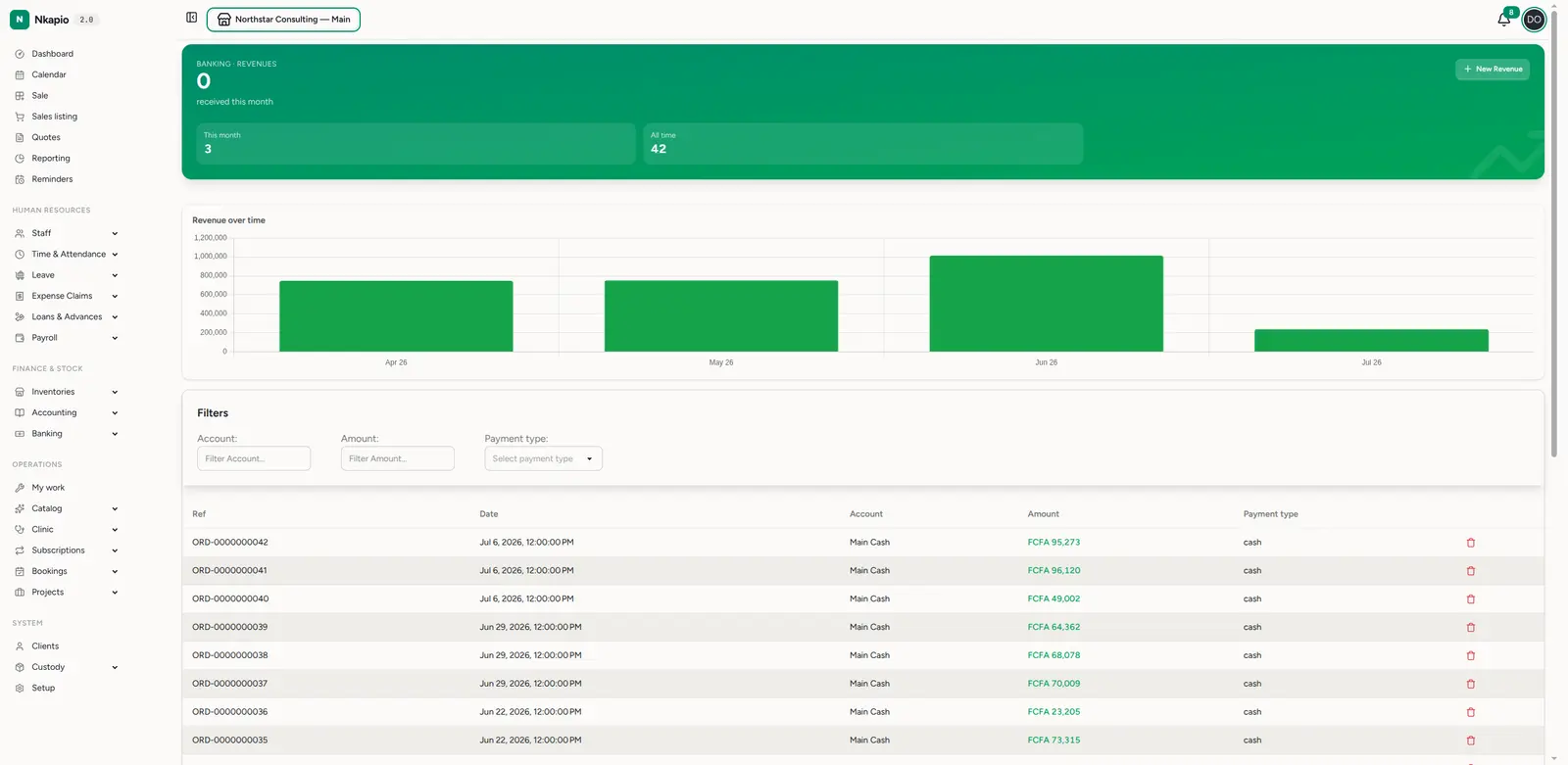
Open Banking → Revenues (/banking/revenues) for everything you've logged.
The page opens with the total received this month and lifetime counts, plus a
short trend of revenue over time. Below that, each entry shows its reference,
date, account, amount and payment type. Sort or filter to find a
specific one, or click New Revenue to add income.
Recording other revenue
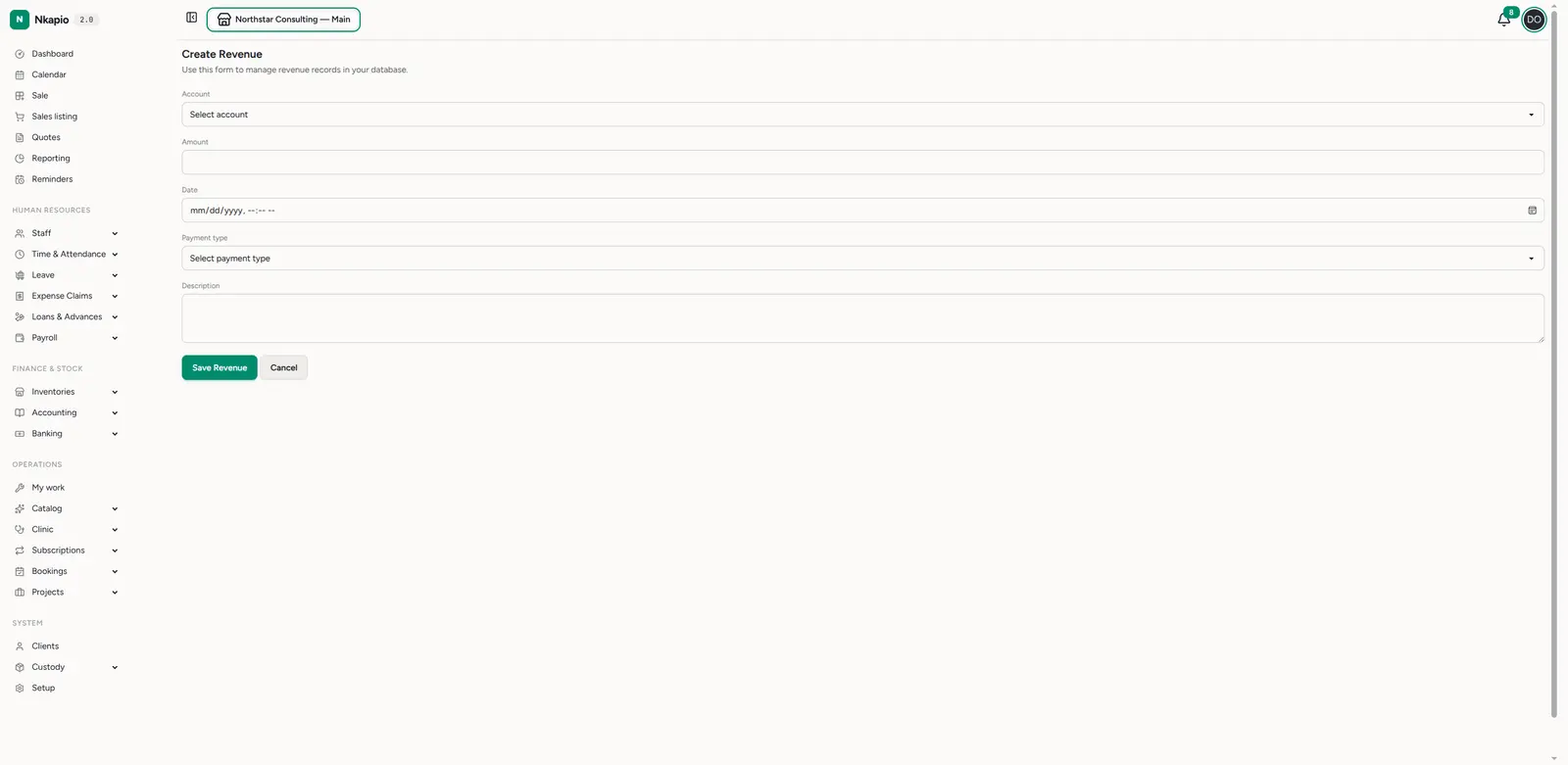
Click New Revenue and fill in the form:
- Account — the cash box or bank account the money actually landed in.
- Amount — how much came in. It must be a positive figure.
- Date — when it arrived.
- Payment type — cash, transfer, mobile money, and so on, matching how it was received.
- Description — a short note on what the money was. This is required, so every entry carries its own explanation.
Save, and Nkapio stamps the entry with a unique reference (a REV- number),
adds the amount to that account's balance, and lists it on the account's
statement — exactly as if you'd banked it by hand, but tracked. You can open any
entry later to review it or Edit revenue to correct a mistake.
How it affects your accounts
Other revenue is a banking movement, not a sale. When you save an entry, the amount is credited to the account you chose and its balance goes up; the receipt then appears on that account's statement alongside every other movement. If you edit an entry and switch it to a different account, Nkapio moves the money for you — it removes the amount from the old account and adds it to the new one. Deleting an entry reverses the credit, so the account balance always reflects reality.
Before you start
- You need banking permission. Creating, editing, and deleting revenue is restricted; if you don't see New Revenue, ask an owner to grant the right.
- Pick a real account. Set up your cash boxes and bank accounts first — the amount is credited to whichever one you select, so choosing the wrong account quietly throws that balance off.
- You see your own entries unless you've been given broader banking access, in which case the full list is visible.
Tips
- Keep it for non-sales income only — sales should go through the POS or an invoice so they land in your sales reports; use other revenue for everything else.
- Describe it clearly — "Q2 office sub-let" is far more useful on a statement than "payment", and the description is the only free-text clue you'll have months later.
- Pick the right account — choose the cash box or bank account the money actually arrived in so balances stay real.
- Match the payment type — recording it the way the money came in (cash vs. transfer vs. mobile money) makes reconciliation with your bank far easier.
FAQ
Does other revenue show up in my sales reports? No. It's income that isn't a sale, so it stays out of sales figures on purpose. It lives in Banking and on the account statement instead.
I logged it against the wrong account — what now? Open the entry, choose Edit revenue, and switch the account. Nkapio corrects both balances automatically.
Can I record income I haven't received yet? No. Other revenue is for money that has actually arrived. If you're still waiting to be paid for something you sold, raise an invoice instead.