When part of a visit is covered by an insurer, mutuelle, or employer, Nkapio splits the bill into the patient's share and the payer's share. The patient is only billed their share, and the payer's share is tracked separately as a claim — a receivable you settle once the payer remits. Everything lives under Clinic → Diagnostics.
Three pieces work together: payers (who can be billed), each patient's coverage (which payer pays, and how much), and the claims that fall out of that split. Payers and claims are back-office records, typically handled by whoever manages billing; a patient's coverage is set alongside their clinical record by the care team.
Payers
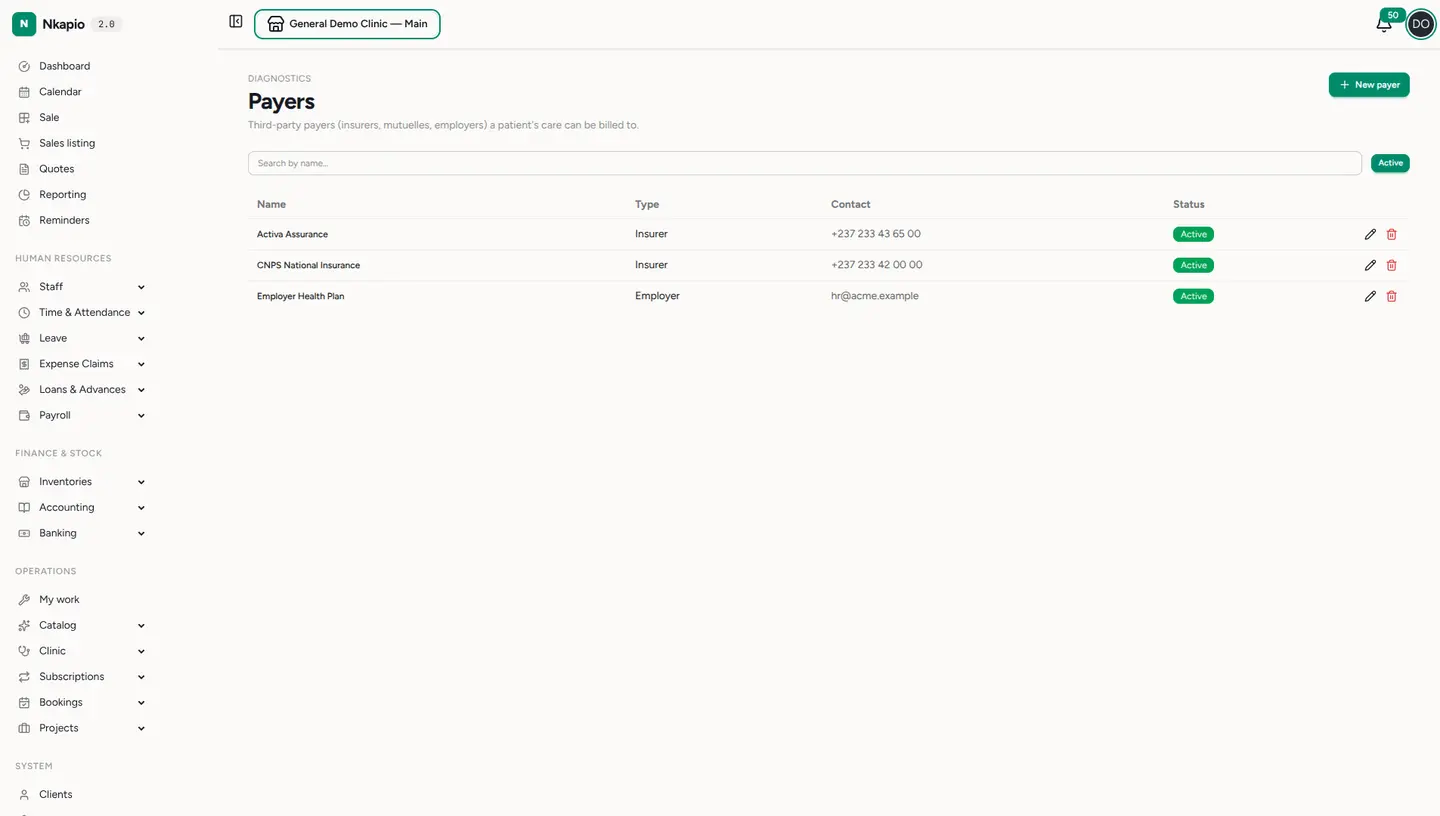
Diagnostics → Payers is your directory of third-party payers a patient's care can be billed to. Add each one with a name, a type — insurer, mutuelle, employer, or other — and an optional contact. Search by name and use the Active filter to focus the list. Only active payers are offered when you set up coverage, so archiving a payer (the trash icon) simply retires it from future use without touching the claims already on file.
Patient coverage
Coverage is recorded on the patient's record: pick the default payer and a coverage percentage from 0 to 100. Nkapio snapshots that payer and percentage onto each new visit as it starts, so the split is applied automatically without anyone re-entering it visit by visit. A patient can have their coverage deactivated when it lapses, and updates take effect on their next visit rather than rewriting past ones.
The percentage drives the arithmetic: the payer's share is that percentage of the visit's total charges, and the patient's share is the remainder. On the patient's invoice the payer's share is applied as a discount, so the invoice only asks the patient for their own portion.
Claims
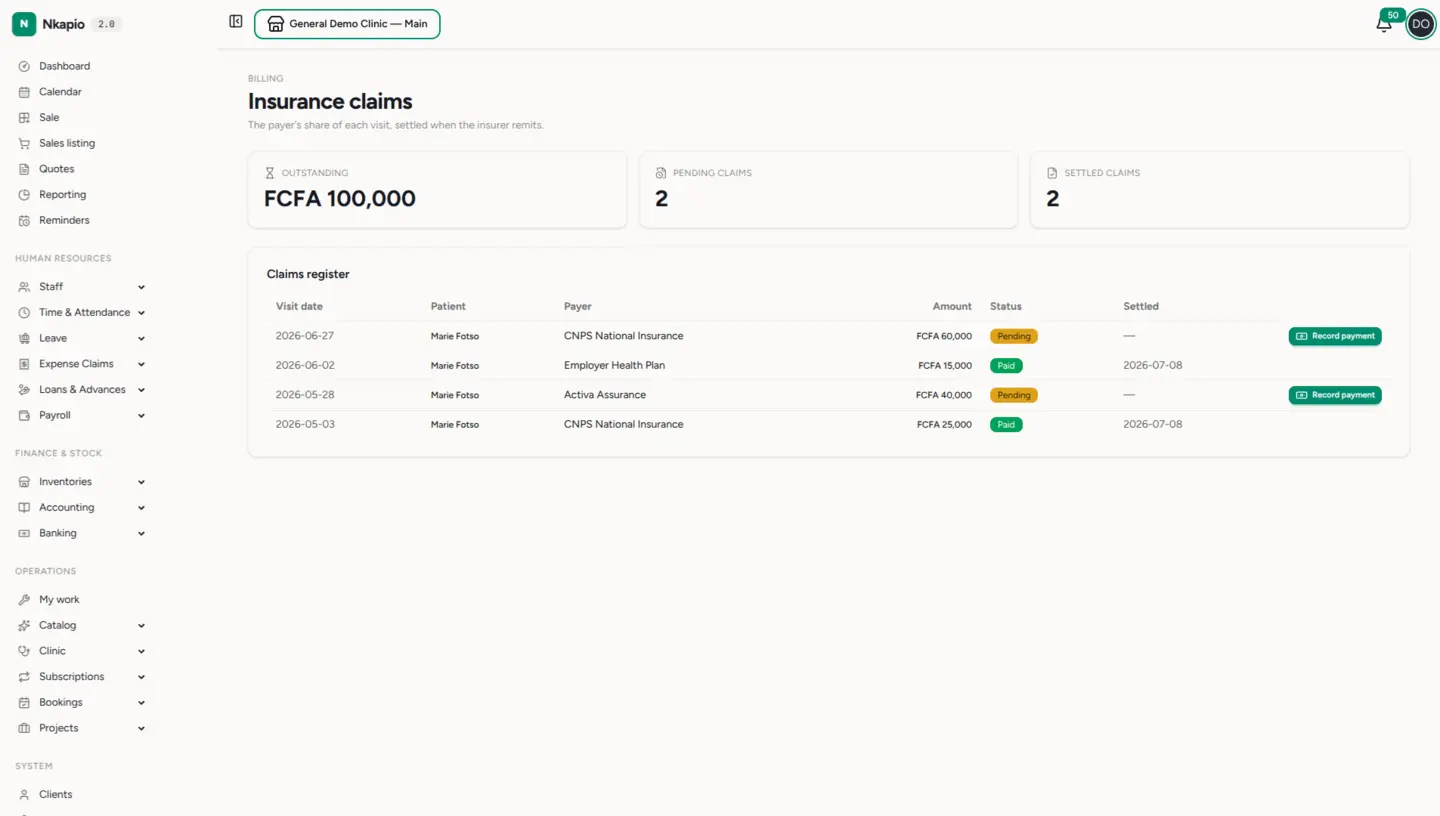
Diagnostics → Claims is the register of every payer share. A claim is created automatically when a covered visit is settled — one claim per visit — so you don't add claims by hand here; they appear as visits close. Each row lists the visit date, patient (linking back to the visit), payer, amount, status, and settlement date. The summary cards above show the total outstanding amount still owed by payers, plus counts of pending and settled claims.
Claims carry one of two statuses: Pending until the payer pays, then Paid once fully settled. When a payer remits, use Record payment on a pending claim: enter the amount received, the payment method, and the account it credits. This books the remittance as real revenue, so settlement is an auditable cash movement rather than a simple toggle.
Tips & common questions
- A payment for less than the claimed amount leaves the claim pending so you can record the balance later; paying the full amount marks it paid and stamps the settlement date.
- No claim showed up for a covered visit? Check that the visit had both a payer and a coverage percentage above 0 when it was settled — a 0% or payer-less visit produces no claim.
- Changed a patient's coverage? The new payer or percentage applies to their next visit; visits already in progress keep the values snapshotted at start.
- Payers, coverage, and claims are permission-gated, and the whole area requires the Diagnostics feature to be enabled for your clinic.